# Re-Doing the Django Tutorial With FastAPI And React: Building the CRUD endpoints!
*Note: This is part 3 of a multi-part tutorial on FastApi and React, if you've not read the previous part, start [here](https://dev.indooroutdoor.io/series/fastapi-react-poll-app) !*
Welcome to part 3 of the tutorial, today we'll see how to use path operations to return information from our Database. It's CRUD time ! We'll start with R though ! 😋
Last time in part 2, we set up our Postgres Database, wrote the models and generated the associated migrations. Today we'll pick up where we left off and start doing something useful with our endpoints: returning some information stored in the DB.
As in the Django tutorial we'll display the list of existing polls, and the associated results. There is one key difference though. Django being a [monolithic Framework](https://en.wikipedia.org/wiki/Monolithic_application), it handles both querying the database AND rendering the resulting information to the client using an HTML templating language. FastAPI, however is only concerned with the API side of things, meaning we'll have to build the UI separately.
We'll use React and the excellent [create-react-app](https://reactjs.org/docs/create-a-new-react-app.html) to build the UI. I initially did both - The CRUD and the UI - in this article, but it ended up being super long so I decided to split it. I'll post the React part later this week so stay tuned ! 🚀
On Today's Menu:
- Creating some CRUD utilities
- Using path operations to expose some information from our database
## Crud
It's time to rip the benefits of all the set up we did in part 2. Thanks to our previous work, our database if already fully, set up so run `docker-compose up` from the root of the project to spin up everything and let's get coding! The first thing we'll do is creating some crud utilities for reading from our database. Well create two functions:
- `get_question` to fetch a specific question based on an ID;
- `list_questions` to list all the existing polls
Add a `crud.py` file in your poll app and write the following code in it:
```python
# crud.py
from sqlalchemy import select
from sqlalchemy.orm import Session
from polls import models
from polls import schemas
def get_question(db: Session, question_id: int):
question_query = select(models.Question).where(models.Question.id == question_id)
question = db.execute(question_query).one().Question
return question
def list_questions(db: Session):
question_query = select(models.Question)
questions = db.execute(question_query).scalars().all()
return questions
```
He're we're using a Session object to communicate with the database using our orm, SQLAlchemy. We'll worry about passing a session to our functions later, for now let's just assume we have one. As you can see, SQLAlchemy once again is a bit more explicit in its use than `django-orm`. The querying syntax looks a lot like SQL, and that's what I like it so much: if you'realready comfortable working with SQL, learning to use SQLAlchemy is a breeze!
*Yes I am aware I've written SQLAlchemy 3 times in 3 sentences, and here's another one for your trouble*
For example `select(models.Question).where(models.Question.id == question_id)` is equivalent to the following SQL statement:
```sql
SELECT
*
FROM
polls_question
WHERE polls_question.id = 1
```
The structure is almost exactly the same, the table name are simply replaced with our models name !

The only thing that might not be obvious here is the way the related choices are fetched. In SQL land we'd need to perform the following join to
get the choices associated with each question (and in so doing, creating duplicate questions in the results !).
```SQL
SELECT
*
FROM
polls_question as question
LEFT JOIN polls_choice as choice on choice.question_id = question.id
```
With SQLAlchemy, the [relationship](https://docs.sqlalchemy.org/en/14/orm/relationships.html) will take care of that for us, as we'll see in the next section !
## Pydantic models
Now that our CRUD is ready, we'll also need a way to convert the results into a format that can be send in an HTTP response. [Pydantic](https://pydantic-docs.helpmanual.io/) will take care of that for us ! We already used it in part 2 to load our environment variables, but it can do much more ! If you're familiar with DRF pydantic *models*, they fill the same functino as DRF's serializers:
- Deserializing and validating input from outside the API
- Serializing and validating output from our endpoints
Regarding validations errors, it's important to note that error raise when deserializing the data from a request will automatically rais a 422 HTTP error, while validation error when serializer the endpionts output will raise an unhandled exception. This is because a validation error when serializing data on which we have complete control point to a configuration error on our part, and not a user error.
One last thing before we dive in: pydantic like SQLAlchemy uses the term "model". This tends to make this kind of tutorial a bit confusing if it's your first time workng with both. Thus from now on, like in the Fastapi doc, I will be refering to Pydantic models as *schemas*!
With this out of the way, let's write schemas we need to serialize the our CRUD's ouput. Add a `schemas.py` file to your poll app, and create the following *schemas* :
```python
# app/polls/schemas.py
import datetime
from typing import List
import pydantic
class Choice(pydantic.BaseModel):
choice_text: str
votes: int
class Config:
orm_mode = True
class Question(pydantic.BaseModel):
id: int
question_text: str
pub_date: datetime.datetime
class Config:
orm_mode = True
class ReadQuestionChoices(ReadQuestion):
id: int
question_text: str
pub_date: datetime.datetime
choices: List[BaseChoice]
class Config:
orm_mode = True
```
Contrary to DRF theres is no out-of-the-box way to generate the schemas from the ORM declaration. However as you can see the `Question` *schema* and the `Question` *model*, are *very* similar. This is not ideal, as this can lead to a bit of code duplication.
[Tiangolo](https://twitter.com/tiangolo), the author of FastAPI, got us covered tho ! A few months ago he released [SQLModel](https://sqlmodel.tiangolo.com/), a library that aims to fill that gap by wrapping Pydantic and SQLAlchemy. I will not dive more into it for now, , as I believe it's important to understand the problem a tool is designed to solve before using it! I might do a dedicated article later in this tutorial though !
Of note here is the use of nested *schemas*, and the orm modes. Setting `orm_mode` to true means that pydantic will know to access the attributes with the `object.attribute` syntax rather than `dict['key']`. And when accessing the `choices` attribute, SQLAlchemy will take care of making the necessary joins, which will offer us a nice nested structure where each question is associated with an array of related choices.
One last thing: you might have noticed than `ReadQuestion` and `ReadQuestionChoices` have most of their attributes in common, which is not very DRY. Pydantic support inheriting from existing schemas though, which means we can re-write it like that:
```python
import datetime
from typing import List
import pydantic
class BaseChoice(pydantic.BaseModel):
choice_text: str
votes: int
class Config:
orm_mode = True
class BaseQuestion(pydantic.BaseModel):
question_text: str
pub_date: datetime.datetime
class Config:
orm_mode = True
# We only include the id when reading
# That way we can reuse base question
# When creating our write schemas
class ReadQuestion(BaseQuestion):
id: int
class ReadQuestionChoices(ReadQuestion):
choices: List[BaseChoice]
```
There all good !
## Building the Endpoints
Now we've got all the tools we need to create our path operations !
We'll need to read endpoints:
- An endpoint to list the existing questions: `/polls/`;
- And endpiont to dipslay the details of the questins: `/polls/{id}`
In the Django tutorial, more *views* are built, because the views are also responsible for rendering the UI, so there need to be at least one per page. However, we're not building a monolith here ! The *pages* will be created in React in part 4, and the form and result page, for example, will both use the `GET /polls/{id}` endpoint to fetch the data they need.
In `polls/endpoints.py` create those two path operations :
```python
# polls/endpoints.py
from typing import List
from . import schemas
from . import crud
@router.get("/", response_model=List[schemas.ReadQuestion])
async def index():
return crud.list_questions(db)
@router.get("/{id}/", response_model=schemas.ReadQuestionChoices)
async def question_detail(id: int):
try:
return crud.get_question(db, id)
except NoResultFound:
raise HTTPException(
status_code=404,
detail="Token does not exist",
)
```
There are a few things going on here:
- We've added a second argument to the `router.get` call : the `response_model`. This response model will be applied to the value returned by the path operation, before sending the response to the client. We're using the `List` type from the standard `typing` package to specify that we returns several questions in the index.
- In the `question_detail` path operation, we specify the {id} in the router url, and FastAPI is smart enough to automatically pass it as the first parameter to our path operations !
- We're using fastapi [HTTPException](https://fastapi.tiangolo.com/tutorial/dependencies/dependencies-in-path-operation-decorators/?h=exceptions#raise-exceptions) to automatically return a 404 error if there is no question matching the providing ID.
The type int and path parameters are also used by FastAPI to generate the automatic documentation !
However, If you've been paying attention you might have noticed that something is missing. Our crud utils need a `Session` objects to communicate with the database. We're passing them a variable called `db` here, but it's not defined anywhere yet !
To retrieve this Session objects, we'll use one of FastAPI main selling point: its [dependency injection system](https://fastapi.tiangolo.com/tutorial/dependencies/) !
**What is dependeny injection** ?
If you've alredy work with a Framework before, you should be familiar with the term. Dependency injection is a form of inversion of control that allows a "client" to specify
the dependencies it needs an trust that an other agent, oftenime the framework, will provide them at the right time.
For example in Django's view, the `self.request` object available in Class Based view is a dependency injection pattern ! Hope this clears at up !

*Isn't it ?*
The dependency we're looking to inject is a Session. To do so, we declare a function that returns a session using the `SessionLocal` we created in `database.py` we created in [part 2](https://dev.indooroutdoor.io/building-the-poll-app-from-the-django-tutorial-with-fastapi-and-react-2)
```python
# polls/endpoints.py
# Database session as a dependency
def get_db():
db = database.SessionLocal()
try:
yield db
finally:
db.close()
```
The code after the yield instructions will be execute right after our path operation is done sending the response. This way we can make sure the session is closed correctly ! Now we can use the `Depends` function providing from FastAPI:
```python
# polls/endpoints.py
...
from fastapi import Depends
...
@router.get("/", response_model=List[schemas.ReadQuestion])
async def index(db=Depends(get_db)):
return crud.list_questions(db)
@router.get("/{id}/", response_model=schemas.ReadQuestionChoices)
async def question_detail(id: int, db=Depends(get_db)):
try:
return crud.get_question(db, id)
except NoResultFound:
raise HTTPException(
status_code=404,
detail="Token does not exist",
)
```
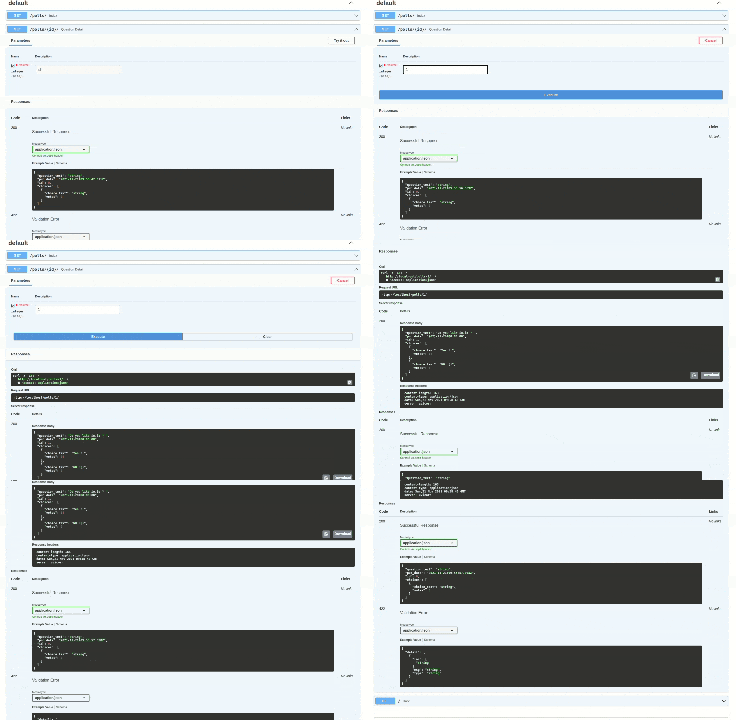
Now everything should be working ! You can try out your endpoints using the automatic documentation available at `localhost/docs`. Create a few questions using [PGAdmin](https://dev.indooroutdoor.io/building-the-poll-app-from-the-django-tutorial-with-fastapi-and-react-2) or a psql client to create a few questions and choices, and try it out ! Everyting should be working smootlhy, and Swagger should display some information about the reponse form that matches our pydantic *schemas*.
Awesome ! There is one last thing to do before we conclude. If we want to be able to make request from our UI to our API in part4, we need to take care of these pesky CORS headers. In the past setting those headers correctly as been the cause of many headaches, for many developers. With FastAPI howerver, nothing's more simple ! We just need to use the `CORSMiddleware` in `main.py`:
```python
# main.py
...
from fastapi.middleware.cors import CORSMiddleware
origins = ["http://localhost:3000"]
...
app.add_middleware(
CORSMiddleware,
allow_origins=origins,
allow_credentials=True,
allow_methods=["*"],
allow_headers=["*"],
)
...
```
Great ! Now we're ready to build an UI to talk with our brand new API !
## Conclusion
That's it for today, hope you enjoyed it ! Part 4 we'll be coming soon, and we'll be focused on building an UI for our endpoints using React. I'm still debating if I should put everything React-relate into specific articles, I'd be glad to know what you think. Let me know on [Twitter](https://twitter.com/JiBRocher), you feedback is invaluable !
## References
1. [FastAPI CRUD](https://fastapi.tiangolo.com/tutorial/sql-databases/?h=crud#crud-utils)
2. [Pydantic Documentation](https://pydantic-docs.helpmanual.io/)
3. [SLQModel](https://sqlmodel.tiangolo.com/)